Photo Session Card Template: Your Quick Start to Professional Marketing
There is a specific moment in every photographer's workflow where the business side meets the creative side: the post-shoot presentation. You have captured the images, but how do you package the experience? Sending a digital gallery is functional, but it often lacks the tactile, emotional weight of a physical product. This is where a high-quality Photo Session Card Template becomes an indispensable tool. It bridges the gap between raw digital files and a polished brand experience, allowing you to present your work in a format that feels intentional and premium.
Unlike generic office templates, this specific design asset is built for the Adobe Photoshop environment. It acknowledges that you, as a creative professional, need control. The file is a Layered Photoshop (.PSD) document, which means you aren't just slapping a logo on a flat image. You are working with a structured file where every element—from the background texture to the price box—is isolated. This allows for a level of customization that flat image formats simply cannot offer. When you open the file, you aren't met with a locked layer; you are met with a canvas ready for your specific brand identity.
Anatomy of a Professional Design Asset
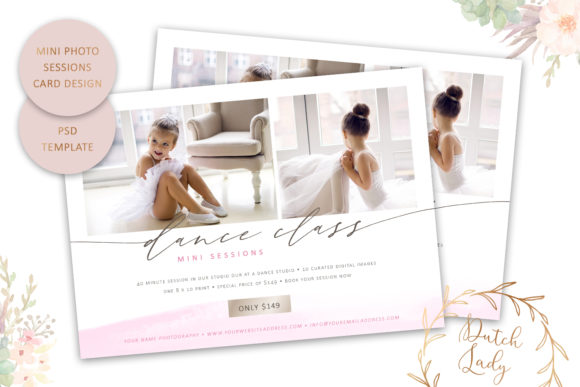
The strength of this template lies in its technical specifications and aesthetic balance. At 7 x 5 inches, it adheres to the US standard postcard size. This is a deliberate choice. It ensures compatibility with standard envelopes and mailing requirements, but it also serves as the perfect dimension for a "Thank You" card or a referral insert. The High Resolution (300 dpi) setting is non-negotiable for print. It ensures that your watercolor smears and text remain crisp, preventing the pixelation that plagues lower-quality design assets.
Visually, the template utilizes a modern, artistic personality. The inclusion of "watercolor smears" suggests a soft, organic aesthetic that appeals to contemporary audiences. It moves away from the rigid, corporate feel of standard marketing collateral. Instead, it embraces a style that feels hand-crafted and personal. However, the design maintains a professional structure with a dedicated "price box" area. This is crucial for visual hierarchy; it guides the viewer's eye from the aesthetic appeal of the image to the practical information regarding your services or products.
Customization and Font Integration
One of the most significant advantages of this Photo Session Card Template is the inclusion of the font files. In the world of graphic design, font licensing is often a headache. By including the typefaces used in the original design, this product removes the barrier to entry. You can immediately see how the serif font or sans serif font choices interact with the layout.
The template encourages you to experiment with typography. Whether you prefer a script font for a whimsical, bridal look or a bold display font for a high-fashion editorial vibe, the layered nature of the file supports it. You can adjust the color, size, and position of the text to match your specific brand identity. This flexibility is vital. A family photographer needs a different tone than a commercial product photographer. The template does not force a single aesthetic; it provides a framework for yours.
Strategic Applications for Creatives
Understanding the file is one thing; applying it effectively is another. This template is not limited to post-session thank you notes. Its utility spans various aspects of marketing and branding.
- Pricing Menus: Use the dedicated price box area to create elegant, physical pricing guides. In a digital world, a printed menu can feel luxurious and worth reading.
- Mini-Session Marketing: For seasonal events or holiday mini-sessions, this card is the perfect size for mailers or in-person handouts at local businesses.
- Referral Cards: Customize the text to encourage word-of-mouth marketing. A physical card is much harder to ignore than an email link.
- Digital Overlays: While designed for print, the high-res PSD file can be adapted for web design elements or social media graphics, ensuring your online presence matches your physical collateral.
Print Production and Technical Workflow
A common friction point in design is the transition from screen to paper. This template addresses that by including proper bleed and trimming space. For the non-designer, "bleed" is the area that extends beyond the cut line, ensuring that you don't end up with a white sliver of unprinted paper if the cut is slightly off. This technical foresight saves time and money at the print shop.
It is important to note the software compatibility. The file is optimized for Adobe Photoshop CC and CS6. It is not compatible with Photoshop Elements. This distinction matters because full Photoshop allows for the complex layer manipulation required to edit the watercolor elements and background colors effectively. If you are using this template, you are expected to have a working knowledge of layers and smart objects.
Evaluating Fit and Consistency
Before integrating this Photo Session Card Template into your workflow, it is worth evaluating how it aligns with your existing assets. A cohesive brand identity relies on consistency. Does the watercolor aesthetic match your logo? Does the layout complement your website design? While the colors of the layout parts are customizable, the fundamental shape language—soft textures combined with structured text boxes—should resonate with your brand's voice.
When testing the template, print a proof before committing to a large run. Colors often shift between screen and paper. By utilizing the 300 dpi file at a local print shop, you can verify that the readability of the text holds up and that the "bleed" area is sufficient for their cutting equipment. This practical step ensures that the final product reflects the professionalism of your photography business.
Ultimately, this template serves as a design asset that elevates your client interaction. It transforms a transactional exchange into a branded experience. By taking control of the customization—adjusting the fonts, tweaking the colors, and utilizing the high-resolution print capabilities—you signal to your clients that you care about the details. In a competitive market, that attention to detail is what builds loyalty and recognition.