Loop: The Social Media App That Keeps You Connected
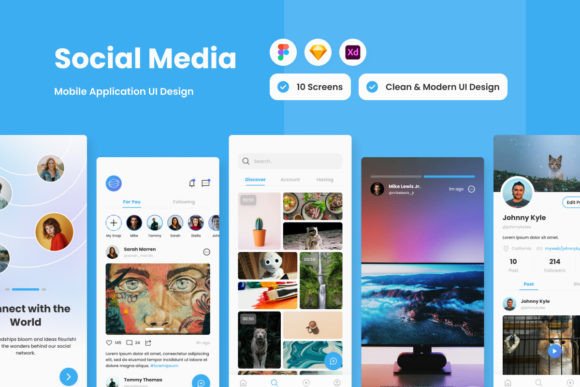
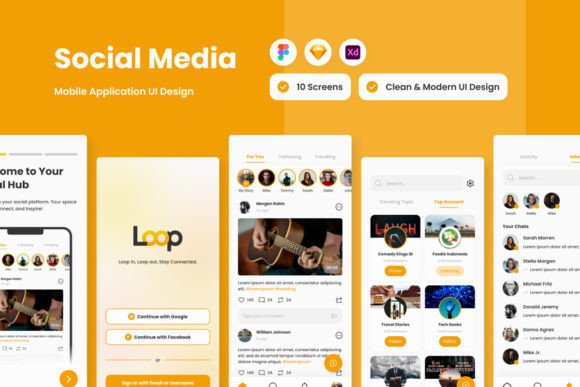
There’s a certain energy to a well-designed social platform. It’s not just about the features; it’s about how the entire experience feels. Loop - Social Media Mobile App captures this energy perfectly. It’s designed to be a continuous, engaging stream where stories unfold naturally, conversations spark easily, and connections feel meaningful. Think of it as your digital circle—a place to loop in friends, tune into what’s trending, and immerse yourself in a dynamic world of interaction. But what makes this app template stand out isn’t just its concept; it’s the meticulous, professional execution that makes it a powerful tool for anyone building a social experience.
A Foundation of Professional Design
The first thing you notice about the Loop design is its high-quality screen layout. This isn’t a rough sketch; it’s a polished, production-ready foundation. The visual personality is clean, modern, and approachable. It uses a contemporary typographic hierarchy that guides the eye effortlessly from a user’s story to a trending topic or a direct message. The style balances vibrant energy with enough white space to prevent overwhelm, making it suitable for a broad adult audience—from a twenty-something entrepreneur to a fifty-year-old content creator.
Practically speaking, this is a designer’s dream asset. The layers are meticulously organized and neat, which means you won’t waste hours digging through a chaotic file to change a button color or adjust a layout. The design is intentionally built to be easy to adjust. Global text and color styles are integrated, allowing for swift brand alignment. Need to swap the primary accent color to match your client’s brand? It’s a few clicks, not a full redesign. This kind of thoughtful structure is what separates a professional design asset from a simple mockup.
Where This Design System Shines
The versatility of the Loop template is one of its greatest strengths. Because it’s provided in multiple formats—.fig, .xd, .sketch, .psd—it slots right into your existing workflow, whether you live in Figma, Adobe XD, or Sketch. This compatibility is crucial for real-world projects where collaboration and tool preference matter.
Consider its applications:
- For Entrepreneurs & Startups: Use the screens as a direct blueprint to pitch and develop a niche community app. The professional polish instantly elevates your prototype, helping you secure funding or early user interest.
- For Marketers & Brand Strategists: The layout principles are excellent for planning social media campaign flows or designing branded content hubs. The visual hierarchy demonstrates how to prioritize information for maximum engagement.
- For UI/UX Designers: Study the component structure and interaction patterns. The organized layers make it easy to deconstruct and learn from, or to use as a robust starting point for a custom project, saving weeks of foundational work.
- For Content Creators & Bloggers: Visualize your own digital platform. The design’s focus on stories and conversations can inspire how you structure your own website or member portal, translating social engagement principles to your owned media.
It’s important to note that the images used in the preview are for demonstration only and are not included. This is standard practice and actually works in your favor—it encourages you to define your own visual language from the start, ensuring your final product is uniquely yours.
Making It Your Own: Practical Guidance
Adopting a design system like Loop is about more than just downloading files. Here’s how to approach it effectively:
First, evaluate the fit for your project. Does your concept revolve around community, real-time interaction, and visual storytelling? If yes, Loop’s personality is likely a strong match. Its modern, sans-serif typography (using open-source fonts, which is a huge plus for licensing simplicity) supports clarity and a friendly tone, which is essential for social apps where readability is paramount.
Next, test and customize. Don’t just use it as-is. Pull the color styles and experiment. Try pairing the primary typeface with a complementary serif font for longer articles or a script font for celebratory notifications to add personality. The organized file structure makes this experimentation efficient. Check how text scales, how icons look in different contexts, and how the visual flow holds up with your specific content.
Finally, think about brand consistency. A tool like Loop provides a cohesive visual system. When you apply your brand’s colors and typography consistently across every screen, you build recognition and professionalism. The design’s inherent consistency means your users will have a seamless experience, which builds trust—a critical component for any social platform.
Loop - Social Media Mobile App is more than a set of screens; it’s a strategic toolkit. It offers the visual quality and organizational rigor needed to bring a sophisticated social concept to life, whether you’re building the next big community app or designing a compelling social strategy for an existing brand. By leveraging its clean aesthetic and flexible structure, you can focus on what truly matters: creating meaningful connections and engagement.