Simple Email Signature: Your Digital Handshake Template
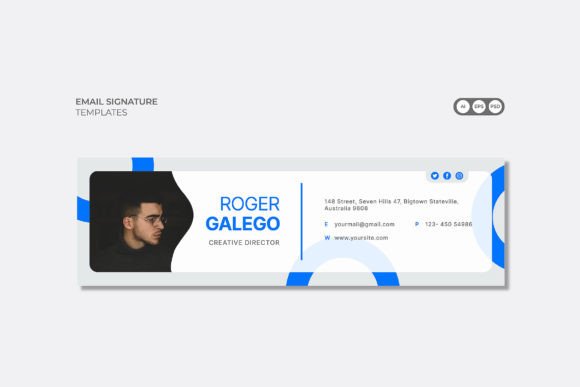
In the digital world, your email signature is often the last thing a client, partner, or prospect sees. It’s your digital handshake, your final chance to leave a professional impression. Yet, so many signatures are either an afterthought—a jumble of mismatched fonts and broken links—or overly complex, cluttering the message. This is where the Simple Email Signature template steps in, offering a clean, multipurpose solution designed to streamline your professional communication. It’s not just a static image; it's a fully editable design asset built for modern business needs.
A Multipurpose Design Asset for Every Professional
The true value of the Simple Email Signature lies in its adaptability. Whether you're a freelancer sending invoices, a startup founder pitching investors, or a marketing manager standardizing your agency's outreach, this template fits the bill. Its visual personality is one of clean minimalism and structured professionalism. It avoids flashy trends in favor of a timeless aesthetic that ensures your contact information is presented with clarity and sophistication. The style is inherently corporate yet versatile enough for personal branding, making it a go-to resource for anyone looking to project competence and attention to detail.
This template is engineered for real-world application across a spectrum of industries. Consider its use in:
- Corporate & Agency Settings: Ensure brand consistency across large teams. The layered, organized files make it simple for a design team to implement company colors and logos, reinforcing a unified brand identity in every correspondence.
- Startups & Small Businesses: For a new venture, credibility is key. A polished signature from this template instantly elevates the professionalism of your emails, helping you compete with more established players.
- Personal & Portfolio Use: Creatives, bloggers, and freelancers can use it to direct traffic to their latest project, social media profiles, or online portfolio, turning a simple sign-off into a marketing tool.
Practicality Meets Professional Polish
Beyond its clean look, the Simple Email Signature is packed with practical features that respect a designer's workflow. Delivered in Ai, Eps, and Psd formats, it integrates seamlessly into Adobe Illustrator and Photoshop CC. The files are fully editable, utilizing Smart Objects in Photoshop for effortless image replacement and well-organized layers that make customization intuitive. You’re not locked into a single color scheme; the RGB color profile with 300 DPI ensures your signature looks sharp on any screen, and the color values can be easily adjusted using CMYK swatches for any print needs.
The template's dimensions of 500x150 px are optimized for email clients, balancing visibility with fast load times. This careful consideration of technical specifications means your signature will render correctly across different platforms, maintaining its intended visual hierarchy. The inclusion of editable text fields allows you to tailor the information precisely, while the clean layout guides the reader's eye naturally from your name to your title and contact details. This structured approach to typography and layout enhances readability and ensures key information isn't lost.
Implementing Your Signature with Confidence
Getting started is straightforward. The package includes a Read me.txt file, which is crucial. Before you even open the design files, take a moment to download and install the recommended fonts linked within. This simple step prevents missing font errors and ensures your signature looks exactly as intended. Once the fonts are in place, open the file in your preferred Adobe application. The intuitive structure means you can swap out the placeholder text, insert your own details, and adjust colors within minutes.
When customizing, think about your broader brand identity. Choose colors that align with your logo and website palette. If you’re using this for a company, consider adding a subtle brand mark or a link to a current promotion. For personal use, a link to your LinkedIn or latest blog post can be highly effective. The goal is to create a signature that feels cohesive with your other design assets, from business cards to social media graphics. This consistency builds recognition and professionalism, subtly reinforcing your brand with every email you send.
Final Considerations for a Lasting Impression
While the Simple Email Signature template provides a stellar foundation, a few best practices will ensure it works hard for you. First, always test your final signature by sending test emails to different clients (like Gmail, Outlook, and Apple Mail) to check for rendering issues. Second, keep the information concise. Your signature should complement your email, not distract from it. Finally, remember that photos and mockups are not included, so use a high-quality, professional headshot or logo to complete the look.
In essence, this template is more than just a file; it’s a tool for crafting a better first (and last) impression. It bridges the gap between generic, uninspired signatures and custom-designed ones that are often out of reach due to time or budget constraints. By offering a blend of aesthetic appeal, technical robustness, and ease of use, the Simple Email Signature empowers you to present your best self in every inbox, efficiently and effectively.